
If you plan to customise a website built with Houzez one of the most important tools to understand is the child theme.
A child theme allows you to modify styling, templates, and functionality without editing the main Houzez theme directly. This keeps your custom work separate from the parent theme so that future updates can be applied safely.
In practical terms, a child theme allows you to customise your site while still benefitting from ongoing improvements to the main theme.
Why Should You Use a Houzez Child Theme?
A Houzez child theme allows you to customise your website without modifying the main theme files.
When the parent theme is updated WordPress replaces those files. Any changes made directly to them would be lost.
A child theme avoids this problem by keeping customisations in a separate layer.
Using a child theme allows you to:
- Update Houzez without losing changes
- Safely customise layouts and templates
- Maintain cleaner, more organised code
- Keep custom styling separate from the core theme
For most Houzez websites using a child theme is the safest and most maintainable way to apply long-term customisations.
How Do You Install the Houzez Child Theme?
The Houzez download package includes a ready-to-use child theme. Installing it is similar to installing any WordPress theme.
Step 1: Locate the Child Theme
After downloading the Houzez package from ThemeForest and extracting it, you will find a Houzez Child Theme zip file:
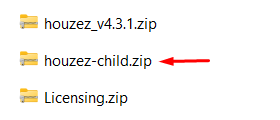
This file contains the basic structure needed for the child theme to inherit functionality from the main Houzez theme.
Step 2: Upload the Child Theme
In the WordPress dashboard:
- Go to ‘Appearance > Themes’
- Click Add New
- Select ‘Upload Theme’
- Upload the Houzez child theme zip file
- Click Install
Step 3: Activate the Child Theme
After installation, activate the child theme.
Once activated, the site will continue to use the Houzez parent theme for functionality, while allowing your child theme to override styles and templates.
How Can You Customise CSS in the Houzez Child Theme?
The child theme contains a style.css file where you can safely add your own CSS.
This file loads after the parent theme styles which means your rules can override the default Houzez styling.
Typical customisations include:
- adjusting colours and typography
- modifying spacing or layout elements
- changing button or form styles
- adjusting property listing presentation
For example:
.property-title {

font-size: 28px;

font-weight: 600;

}
Keeping custom styles in the child theme makes them easier to maintain and prevents them from being overwritten during theme updates.
How Do You Override Houzez Templates in a Child Theme?
Template overrides allow you to modify how specific parts of the site are rendered. Rather than customising just the CSS, this allows you to edit the HTML and the structure of the part you wish to modify.
To override a Houzez template, you copy the relevant file from the parent theme into the child theme while preserving the same folder structure.
Step 1: Locate the Template File
Find the template you want to modify inside the Houzez theme directory. This might be a file responsible for:
- property listings
- search results
- property details pages
- layout components
Step 2: Copy the Template Into the Child Theme
Copy the file into the child theme using the same directory structure.
For example:
/houzez/template-parts/property/property-item.php
would become:
/houzez-child/template-parts/property/property-item.php
Step 3: Modify the Template
Once the file exists in the child theme WordPress will then load that version instead of the parent theme version.
You can then safely adjust markup, layout, or PHP logic without affecting the core theme.
If Houzez is ever updated at a later date then your overridden templates remain unchanged.
Using a child theme is one of the simplest ways to keep a Houzez website maintainable as it evolves. By keeping styling and template changes separate from the parent theme you can customise the site while still applying theme updates safely.