
Houzez is often seen as a WordPress theme for estate agents but, with the right setup, it can also power a full property portal that aggregates listings from multiple agencies, offices, or data sources.
If you’re planning to build a portal-style real estate website, this guide explains how Houzez fits the job, how to structure agencies and listings, and what you need to consider to make the platform scalable and reliable long term.
Why Houzez Is a Great Choice for Property Portals
Houzez provides a strong foundation for portal-style websites because it’s built around structured property data rather than static pages.
Out of the box, it offers:
- A dedicated property post type
- Advanced search and filtering
- Location hierarchies (city, area, neighbourhood)
- Agent and agency profiles
- Map-based browsing
- Flexible listing and archive layouts
This makes it well suited to sites where users are searching, filtering, and comparing a large number of listings.
Just as importantly, Houzez is designed to work well with automation plugins, which is critical once you move beyond manual property management.
Creating Agencies in Houzez
A property portal typically represents multiple agencies, not just one brand. Houzez supports this through its built-in Agency functionality.
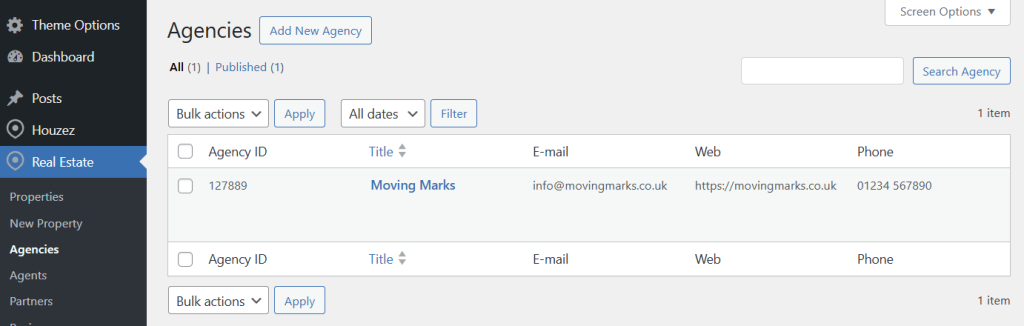
You can create agencies by:
- Navigating to ‘Real Estate > Agencies‘ in the WordPress dashboard
- Adding a new agency profile
- Entering agency details such as name, logo, description, contact information, and location
Each agency acts as its own entity within the site, with its own archive page and branding. This allows portal users to browse listings by agency while still maintaining a consistent overall platform.
Assigning Properties to Agencies
Every property in Houzez can be assigned to an agency.
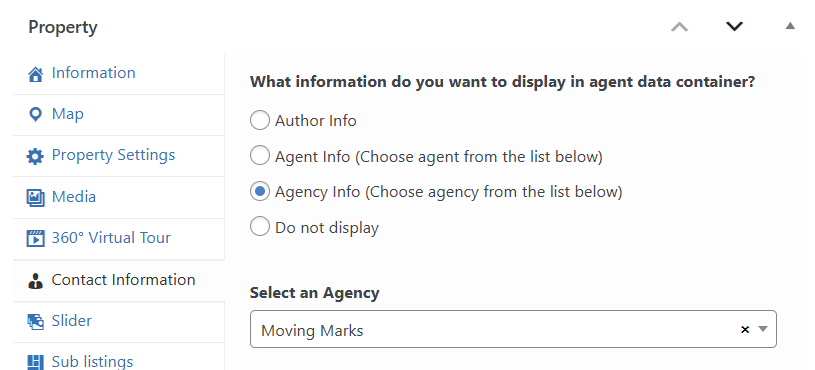
For portals, this is essential. It ensures:
- Each listing is clearly associated with the correct agency
- Agency archive pages show only their own properties
- Agency details and contact information is shown on a property page
- Enquiries can be routed correctly
- Data remains structured as the site grows
When properties are added manually, this assignment is straightforward. When properties are imported automatically, this is handled through field mapping in your import configuration.
Importing Properties from Multiple Agencies Using Houzez Property Feed
Manual property entry doesn’t scale for portals. Most portals rely on automatic imports from multiple agencies, CRMs, or feeds.
This is where the Houzez Property Feed plugin becomes a key part of the setup.
Using the plugin you can:
- Create separate imports for each agency or data source
- Pull listings from different CRMs, XML feeds, CSV files, or other Houzez sites
- Map each feed to the correct agency automatically
- Schedule imports to run independently
- Keep listings up to date without manual intervention
Each import runs independently and only manages the properties it originally created. This avoids conflicts between agencies and ensures one feed cannot accidentally modify or remove another agency’s listings.
For portals this isolation is critical.
Managing Large Numbers of Listings
Property portals often grow quickly. Hundreds of listings become thousands, and performance considerations start to matter.
When using Houzez as a portal you should plan for:
- Adequate disk space for images and media
- Strong hosting (VPS, cloud, or managed WordPress hosting)
- Efficient image handling and cleanup when properties are removed
- Caching and CDNs to keep search and archive pages fast
If you haven’t already, it’s worth reading our earlier post on scaling Houzez for thousands of listings, which covers hosting, performance, and database considerations in more detail.
Final Thoughts
Houzez can be an excellent foundation for a property portal but portals are not just “bigger agency websites”.
They require:
- Thoughtful data structure
- Reliable automation
- Strong hosting and performance planning
- Clear separation between agencies and feeds
With Houzez handling presentation and search, and the Houzez Property Feed plugin managing imports and updates from multiple agencies, you can build a portal that scales cleanly and remains manageable over time.
If you’re planning a multi-agency platform, getting this structure right from the start will save you significant time and complexity as your portal grows.