
If you’re importing property listings into your website, one question that comes up frequently is:
How often should my property feed run?
It sounds simple but the answer has a direct impact on how your site performs and how accurate your listings are.
- Run imports too infrequently and your data becomes outdated.
- Run them too often and you can put unnecessary load on your server.
The goal is to find the right balance.
Why import frequency matters
Property imports directly affect what your visitors see.
If your imports only run once a day, a property that’s been marked as sold or let in the morning could still appear available for hours. That’s not a great experience for users, and it can lead to irrelevant enquiries.
Likewise, if you list a new property in your CRM you want that to appear on your website as soon as possible.
On the flip side, every import consumes resources. It processes data, updates listings, and often downloads images. Increasing frequency means increasing that workload.
Finding the right balance
Every site sits somewhere between two priorities:
- Keeping listings fresh and up to date
- Keeping the site running efficiently
There’s no universal setting that works for everyone, but there are sensible ranges depending on the size and type of site you’re running.
Smaller sites with fewer listings can comfortably run imports more often. The data processes quickly and the impact on performance is minimal.
As your site grows, imports naturally take longer and involve more data. At that point, spacing them out becomes more important. Larger sites often benefit from fewer, more controlled imports rather than frequent updates.
If you’re working with multiple feeds, spreading them throughout the day is usually more efficient than running everything at the same time.
What works in practice
For many sites, running imports every few hours is a solid starting point.
If your site is relatively small, you can run them more frequently without issue. If your dataset is larger, you’ll usually get better results by spacing imports out and allowing each run to complete comfortably.
It’s also worth thinking about how often your data source updates. If your feed only changes once or twice a day, there’s little benefit in importing it every hour.
A good approach is to start with a moderate schedule and adjust based on how your site performs and how fresh you need your data to be.
How to change the import frequency in Houzez Property Feed
If you’re using Houzez Property Feed to import your properties, adjusting your feed schedule is straightforward.
To change it, go to your WordPress admin area and navigate to ‘Houzez > Import Properties‘. From there, edit the feed in question and click the ‘Frequency‘ tab where you can then define how often the import runs:
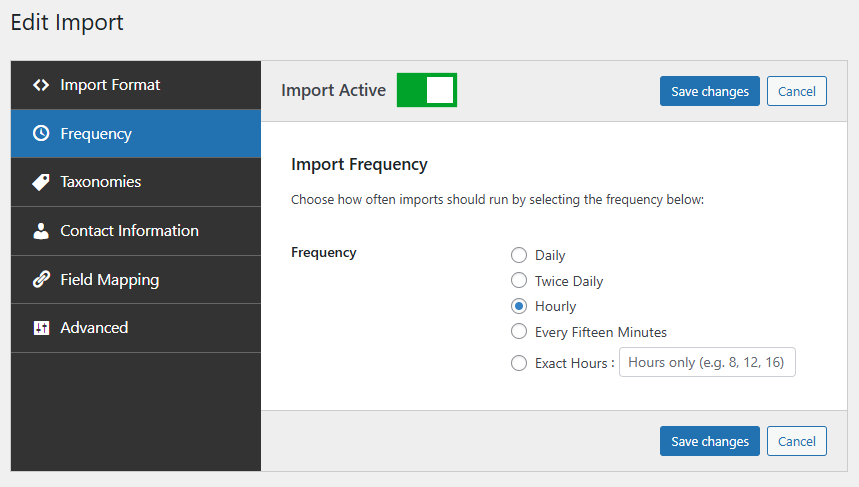
Once saved, the new schedule will take effect automatically. If you’re managing multiple feeds, this flexibility allows you to space them out across the day for a more consistent workload.
Refining your schedule over time
The best import frequency is rarely something you get perfect on the first attempt.
Instead of trying to optimise everything upfront, it’s better to make small adjustments and observe the results. Increase frequency if you need fresher data, or reduce it if you notice unnecessary load.
Over time, you’ll settle on a schedule that fits both your data and your infrastructure.
Final thoughts
There’s no single “correct” answer to how often you should run property imports.
For most sites, running imports every few hours strikes a good balance between data freshness and performance. From there, it’s just a matter of adjusting based on your specific setup.
A well-chosen schedule keeps your listings accurate, your site responsive, and your overall setup running smoothly.